

Azure Network Security Groups (NSG): 2025 Complete Guide to Rules & Best Practices
Every enterprise running workloads in Azure has the same challenge: how do you control what traffic gets in, what gets out, and how resources inside your environment talk to each other? Misconfigured network rules are one of the top causes of breaches and outages in the cloud. That’s where Azure Network Security Groups (NSGs) come in.
This guide explains what NSGs are, how they work, the rules and defaults you need to understand, and the best practices to keep your environment secure in 2025.
What Is an Azure Network Security Group?
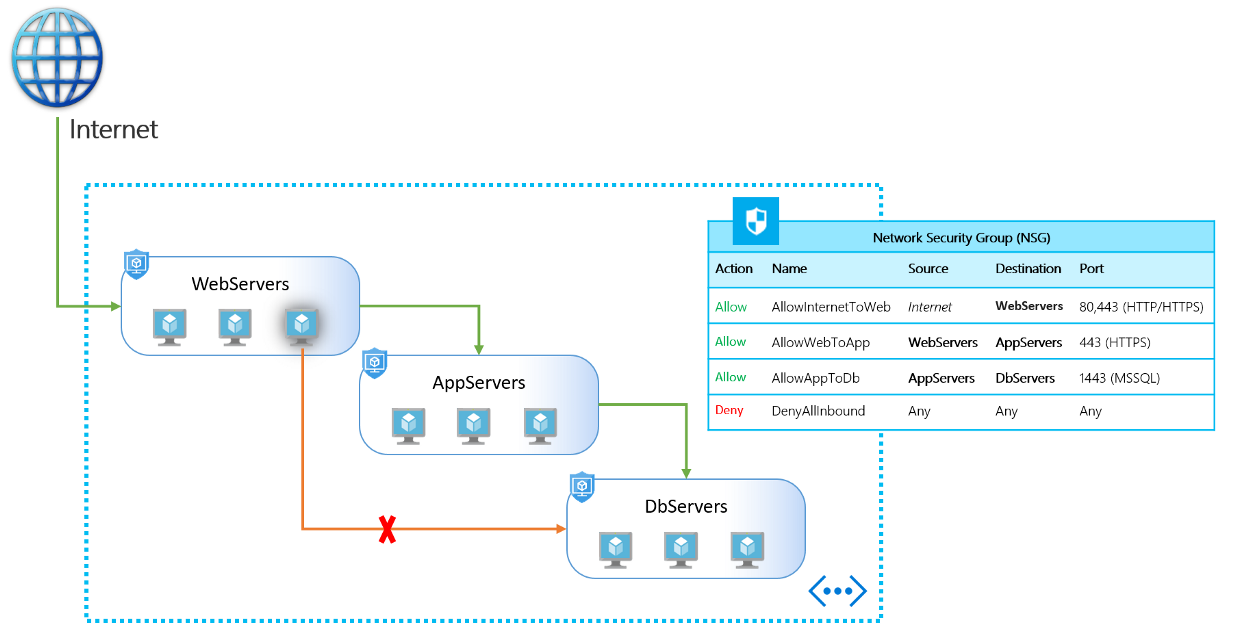
An NSG is a stateful firewall built into Azure that filters inbound and outbound traffic to your resources. Each NSG contains a list of security rules, and each rule defines traffic by source, destination, protocol, and port, with an action to allow or deny.
- Stateful means once traffic is allowed in one direction, the return traffic is automatically allowed.
- Scope means you can apply an NSG at the subnet level (affecting all resources in that subnet) or directly to a network interface card (NIC) on a specific VM.
NSGs are the first line of defense for segmenting Azure virtual networks.
How NSGs Work
When traffic enters or leaves a resource:
- Rules are processed by priority. Lower numbers have higher priority. The first matching rule is applied, and processing stops.
- Inbound rules govern traffic coming into your resource.
- Outbound rules govern traffic leaving your resource.
- Default rules are included automatically. For example:
- Allow traffic within a Virtual Network.
- Allow outbound to the internet.
- Deny all inbound traffic unless explicitly allowed.
By default, if no rule matches, the traffic is denied.
Key Features of NSGs
- Granular control: Define rules based on source IP, destination IP, protocol, and port.
- Segmentation: Apply rules to subnets or individual NICs to isolate workloads.
- Azure Service Tags: Simplify rule creation using tags (e.g., “Storage” or “Internet”) instead of hard-coded IP addresses.
- Application Security Groups (ASGs): Group resources logically (like “web servers”) and apply rules at the group level.
- NSG Flow Logs: Capture and analyze traffic patterns to troubleshoot issues or detect anomalies.
NSG Examples
- Allow HTTP/HTTPS traffic to a web subnet while blocking all other inbound traffic.
- Restrict outbound database traffic to only known internal IP ranges.
- Allow RDP or SSH access only from a specific management subnet.
- Deny all internet access from sensitive workloads while still allowing internal communication.
Azure NSG vs Firewall
NSGs are often confused with Azure Firewall. The difference:
- NSGs are lightweight, rule-based filters at the network and NIC level. Best for segmentation and access control.
- Azure Firewall is a fully managed, stateful firewall with advanced features like application filtering, threat intelligence, and traffic inspection.
Most enterprises use NSGs for baseline segmentation and pair them with Azure Firewall for advanced perimeter and cross-network security.
Azure NSG Best Practices for 2025
- Follow least privilege. Start with “deny all” and allow only what’s required.
- Use service tags and ASGs. Avoid hardcoding IP addresses that change.
- Separate management traffic. Put RDP/SSH rules in a dedicated management subnet.
- Log everything. Turn on NSG flow logs and send them to a SIEM like Microsoft Sentinel.
- Layer controls. Use NSGs with Azure Firewall or Web Application Firewall for defense-in-depth.
- Document and test rules. Regularly review NSG configurations and test connectivity.
- Automate deployment. Use ARM templates, Bicep, or Terraform to avoid manual misconfigurations.
NSG Default Rules
Every NSG comes with a set of default rules, which you can override but not delete:
- AllowVNetInBound – permits traffic within the same virtual network.
- AllowAzureLoadBalancerInBound – allows traffic from the load balancer.
- DenyAllInBound – blocks everything else inbound.
- AllowVNetOutBound – permits outbound traffic within the VNet.
- AllowInternetOutBound – allows outbound internet access.
- DenyAllOutBound – blocks all other outbound traffic.
These defaults provide a secure baseline, but most organizations need to add custom rules for applications.
NSGs and Application Security Groups (ASGs)
NSGs and ASGs often work together:
- Create an ASG for a group of similar resources (e.g., all web servers).
- Write an NSG rule that allows “WebServerASG → DatabaseASG on port 1433.”
This keeps rules readable and scalable, especially in large environments.
Common Mistakes to Avoid
- Overly permissive rules like “Allow All to Internet.”
- Duplicating rules across multiple NSGs, leading to conflicts.
- Forgetting outbound rules — which can expose data exfiltration paths.
- Applying NSGs inconsistently across subnets and NICs.
- Not reviewing or cleaning up old rules that are no longer needed.
Conclusion
Azure Network Security Groups are the backbone of Azure network segmentation and workload protection. They provide flexible, stateful filtering that’s easy to apply and essential for controlling cloud traffic. Used correctly, NSGs reduce attack surfaces, enforce least privilege, and give administrators clear visibility into how data flows.
Enterprises that treat NSGs as a one-time configuration risk gaps and breaches. Those that adopt best practices, pair NSGs with complementary services like Azure Firewall, and continuously monitor and test their rules stay secure and compliant.
Aliando helps organizations design and manage Azure network security at scale — ensuring NSGs, ASGs, and firewalls all work together for a resilient, compliant, and cost-effective cloud environment.